Make a guide to the free stuff in your own neighborhood.
One afternoon. A parent and a kid. At the end you have a real website that real neighbors use, and you will understand how the people who make those sites get paid.
What you are actually making
A single web page listing every free and cheap thing happening for families in your area this week. Library story hours. Free museum nights. Park department events. The workshops Home Depot runs for kids. The stuff that is already happening near you and that almost nobody has bothered to put in one place.
You will make it with an AI chatbot, save it as a file, and put it online at a real address you can text to people. Then you keep doing it every week. That last part is the whole thing.
Why this one and not something flashier
Nobody has done it for your neighborhood. There is a version of this for Brooklyn and one for Annapolis, and then a few thousand towns with nothing. The work is real, the thing you make is useful the day you make it, and every step teaches something that transfers.
Here is one we made.
This is the finished thing, built with the exact three prompts below. Filters, search, the whole list. The events in it are made up because it is an example, but the format is real and it is what you will have by tonight.
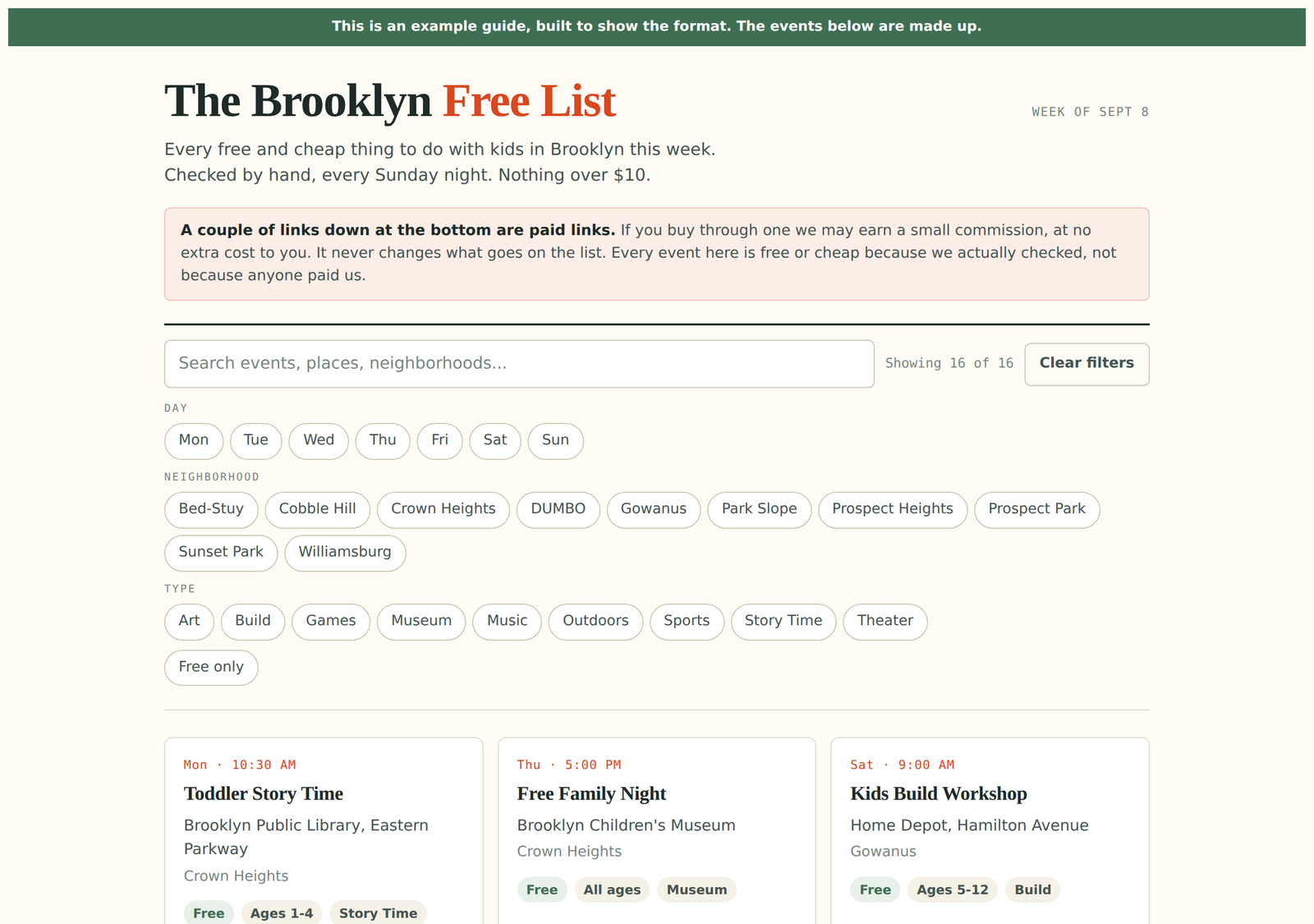
Opens the real page. Try the filters.
What you need
- •A computer. Not a phone, because you will be copying and pasting a lot.
- •Any AI chatbot that can search the web. ChatGPT, Claude, Gemini, Copilot and Perplexity all work, and the free versions are fine. The instructions below do not care which one you pick.
- •About two hours the first time. Under thirty minutes every week after that.
Find the stuff
About 20 minutes, mostly waiting
Open your chatbot. Copy the whole block below, paste it in, and replace everything in yellow with your own answers before you press enter.
Expect 20 to 40 events. Fewer in a small town, and that is fine.
If it comes back thin
Say: Only found a few. Try again and search each of the six sources one at a time instead of all at once. Chatbots rush when you give them a big list. Making it go source by source usually doubles what it finds.
Check the stuff
About 20 minutes. Do not skip this one.
This is the step that separates a guide people trust from a guide people stop opening. AI chatbots make things up. Not on purpose and not always, but often enough that publishing the first list without checking it will eventually send a family across town to a museum that is closed.
Same chat window. Paste this next.
Expect to lose a few. Losing a few is the point.
Teach your kid this part
The checking step is the actual job. Anyone can ask a chatbot for a list. The person people come back to is the one who checked. That is true of this guide and it is true of basically every job your kid will ever have.
Turn it into a web page
About 15 minutes
Same chat. Last prompt.
Then save it
- 1.Click the copy button on the code block the chatbot gives you.
- 2.Open a plain text editor. Notepad on Windows, TextEdit on a Mac. On a Mac, go to Format and choose Make Plain Text first, or it will save wrong.
- 3.Paste. Save it as index.html in a new empty folder on your desktop.
- 4.Double-click the file. It opens in your browser. That is your website, sitting on your computer.
If it looks broken
Go back to the chat and say what is wrong in plain words. The filter buttons do not do anything. Or It looks squished on my phone. Then paste the fixed version over the old file. You are allowed to go back and forth as many times as you want. That is what building something is.
Put it online
About 5 minutes
Go to app.netlify.com/drop and drag your folder onto the page.
That is the whole thing. It is live at a real web address in about ten seconds, and you do not have to make an account or type in a card to do it. Netlify will ask you to sign up afterward if you want to keep the address, which is free and worth doing.
Text the link to three people you know before you do anything else. Not to promote it. To find out in the next twenty minutes whether the thing works on their phone.
Why Netlify and not the others
It is the only one where a ten-year-old can publish without an account. We checked the terms on the alternatives too: Vercel's free plan does not allow sites that make money, and GitHub Pages has a similar restriction. Netlify's support team has confirmed in writing that sites with affiliate links are allowed on the free plan. If you outgrow it, that is a good problem.
Then keep going
- Do it again next week. Steps 1 and 2 take twenty minutes once you have done them once.
- Put the link in local parent Facebook groups, your building's group chat, the school newsletter, the library's bulletin board.
- Add an email signup once people start asking when the next one is coming. Not before.
Now the money part
Read this before you try it
You are giving the guide away. So how does anyone make money doing this?
Affiliate links. When you recommend something and link to where people can buy it, the shop pays you a small cut if somebody buys. The buyer pays exactly the same price either way.
Where you have already seen this
Consumer Reports is the clearest example, and it is the one to show your kid. They are a nonprofit that famously refuses to take advertising, because taking ads from the companies you review is a conflict. They still use affiliate links, and they put the disclosure right under the byline at the top of the article:
When you shop through retailer links on our site, we may earn affiliate commissions. 100% of the fees we collect are used to support our nonprofit mission.
The New York Times does the same thing with Wirecutter, which it bought in 2016 and which brings in tens of millions a year. Wirecutter's own safeguard is worth copying: the writers are not told which products earn the site more money. That way the recommendation cannot be bent by the payout.
Where to start, in this order
| Program | Pays | Why this one |
|---|---|---|
| Bookshop.org | 10% | Easy to get approved, and the money does not come out of the pool they share with independent bookstores. A good first link to practice on. |
| Viator | 8% | Tours and attractions. No follower minimum, and they pay weekly by PayPal with no minimum balance, so you actually see the money. |
| Undercover Tourist | Flat fee | Discount tickets to zoos, museums and aquariums in most big US cities. Check whether yours is covered. |
| Amazon | 3% | Best conversion of any of them, but do not sign up yet. See the warning below. |
The Amazon trap that catches beginners
Amazon gives you 180 days to make three sales after you apply. Miss it and they close the application, and you cannot reapply with the same account. Almost everyone signs up on day one out of excitement, makes nothing because they have no readers yet, and burns it.
Wait until a normal week brings enough people to your guide that three sales is realistic. Then apply. Also: toys, outdoor gear, sports and baby products all pay 3%, so a $30 toy earns you ninety cents.
The disclosure rules, which are short and not optional
The Federal Trade Commission requires you to tell people when a link pays you. Four rules cover nearly all of it:
- •Put it above the link, never at the bottom. The FTC's word is unavoidable. A disclosure a reader hits after they have already clicked does not count. This is the rule almost everyone breaks, including guides much bigger than yours.
- •Say paid link, not affiliate link. The FTC has written that people may not know what affiliate means. Paid link is specifically approved, and Amazon accepts it too, so one phrase covers both.
- •No abbreviations. Not sp, not spon, not a lone hashtag buried in a pile of other hashtags.
- •Only link things you would recommend anyway. This is the only rule that protects the thing you are actually building.
Put this at the top of your page, above the first link:
And put (paid link) right next to each one.
Two rules about kids, and both matter
A kid cannot hold the affiliate account. Amazon and the rest require you to be legally able to sign a contract, which rules out minors, and payouts need a taxpayer ID. The parent opens the account in their own name and the money goes to them. Your kid finds the events, writes the descriptions, picks what is worth recommending, and gets credited as a co-author. All of that is real work and none of it requires their name on a contract.
Write the guide for parents, not for kids. Keep it a parent-facing publication that a kid helps make. Advertising rules aimed at children are much stricter, and a site written to children triggers them. And never have a child personally endorse a product that pays you. That is the exact thing those rules exist to prevent.
What this will actually earn
Almost nothing for a long time, and we would rather say so now.
Across a study of more than 400,000 affiliate clicks, the average click was worth about ten cents. Do that arithmetic honestly. To make a hundred dollars a month you need somewhere around six or seven hundred people clicking a paid link every month, which for a weekly local email is on the order of ten thousand subscribers.
In a 2026 survey of bloggers, the median time to earn a first dollar was twelve months. Those making under 5,000 pageviews a month averaged about fifty dollars a month.
And the most-cited local newsletter success story in America, in Annapolis, does over $400,000 a year with roughly 23,000 subscribers. None of that is affiliate money. Eighty-four percent is local businesses buying ads. It took about four years and it started with seventy subscribers.
So why do the affiliate links at all
Two honest reasons. They teach you how money actually moves on the internet, which is a thing most adults never learn. And a few of them genuinely help your reader, who was going to buy the book anyway.
The money in a local guide, if it ever comes, comes from local businesses paying to reach your neighbors. That is a real business and it is two years away. The guide is what gets you there, and your kid learning to check their own work is worth more than either.
Share what you made
If you build one, put it somewhere other families can find it, and leave the credit line at the bottom so the next family can find the kit. There are a few thousand towns with nobody doing this. Yours might be one of them.
Join the waitlist
The program is free and opens October 4. Put your email in and we'll tell you the day it does.
Free. We'll never share your email.
The full program opens October 4.
This kit is free and yours to keep either way. The program in October is this, plus the next three things to build, plus somewhere to ask when you get stuck.